Basics of NLP - 1 [Week 5]
discussion into how text preprocessing, regex, frequencies, and word embeddings work
You must have used ChatGPT, but how does it work? How does Google Translate work? They all work under the study of Natural Language Processing. Today, we embark on a long journey which was inspired from a tweet from Saurabh Bhaiya [Link to Tweet - Saurabh Kumar on Twitter / X]. Let’s dive deep into the study of NLP.
This blog is broken into 4 pieces
- Text Preprocessing - Lowercasing, Tokenization, Stopword Removal, Stemming, Lemmatization
- Regex - Basics and some examples
- Frequencies - BoW, TF, IDF, TF-IDF
- Word Embeddings - Word2Vec, GloVe
Text Preprocessing
We will be using the NLTK library for this task, make sure import it earlier on using import nltk
Lowercasing
This step is obvious, we do this to ensure consistency. It also reduces the complexity of the text data we are going to input. We can simply just convert every character in the test data to its lower case form.
text=#your input data
text=text.lower()
Tokenization
Imagine you want to teach your kid to study English, instead of teaching him Shakespeare, you will first teach him alphabets, then words then sentences.
Here your child is the machine, and we break down sentences for it to learn so that the sentence is broken into meaningful tokens, which still carry the original essence of context. This makes pattern recognition easier.
Let’s say we have a sentence I am neuralnets.
We can break it down to ["I","am","neuralnets"] . This is word tokenization, which breaks long sentences into individual words.
Now let’s go down one step further. ['I', ' ', 'a', 'm', ' ','n', 'e', 'u', 'r', 'a', 'l', 'n', 'e', 't', 's'] . This kind of tokenization is called character tokenization, mostly used for spelling correction tasks.
We can also break words neuralnets to ["neural","nets"].This kind of tokenization is termed as subword tokenization. This is useful for languages that form meaning by combining smaller tokens.
import nltk
from nltk.tokenize import word_tokenize
nltk.download('punkt')
tokens = word_tokenize("I am neuralnets.")
print("Tokens:", tokens)
Stopword Removal
What is a stopword? They are usually the words that don’t contribute any meaning or context to the sentence. For example, the word the doesn’t bring out any significance to the sentence, hence we can just remove it from the input data. But words which have important context to the sentence, like for example, history can’t be termed as stopwords.
from nltk.corpus import stopwords
stop_words=set(stopwords.words('english')
#this forms a set of stop words
words=[word for word in tokens if word not in stop_words]
#this stores all words in tokens, that are not stopwords
Stemming
Let us consider this sentence, The leaves are falling, have fallen, but will leave behind beauty
With stemming, what we do is chop down the sentence into their root forms, which might not make any sense and lose the meaning of the word.
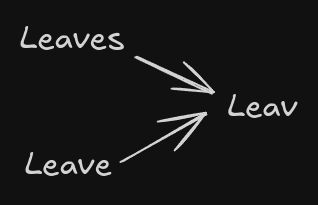
from nltk.stem import PorterStemmer
from nltk.tokenize import word_tokeniz
text = "The leaves are falling, have fallen, but will leave behind beauty."
words = word_tokenize(text)
stemmer = PorterStemmer()
stems = [stemmer.stem(word) for word in words]
print("Stemming Results:", stems)
Lemmatization
Consider the earlier sentence.
What we do here, is we chop down the sentence into their base dictionary word, which considers the meaning and context of the word, hence not making a word, that makes no sense.
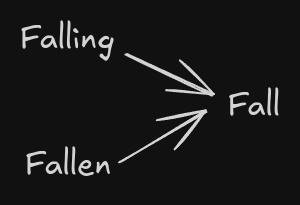
from nltk.stem import WordNetLemmatizer
from nltk.tokenize import word_tokenize
text = "The leaves are falling, have fallen, but will leave behind beauty."
words = word_tokenize(text)
stemmer = WordNetLemmatizer()
lemmas = [lemmatizer.lemmatize(word, pos="v") for word in words]
print("Lemmatization Results:", lemmas)
Regular Expressions(Regex)
A regular expression (shortened as regex) is a sequence of characters that specifies a search pattern in text. Basically it’s a way of finding and searching stuff in a string.
How to write Regex?
→ First we import the regex module with import re
→ Then we need to create a regex object with re.compile
→ We need to pass our input string into the Regex object using search() , which returns an object
→ Finally call the group() function to return a string output from the object.
Common Regex Symbols
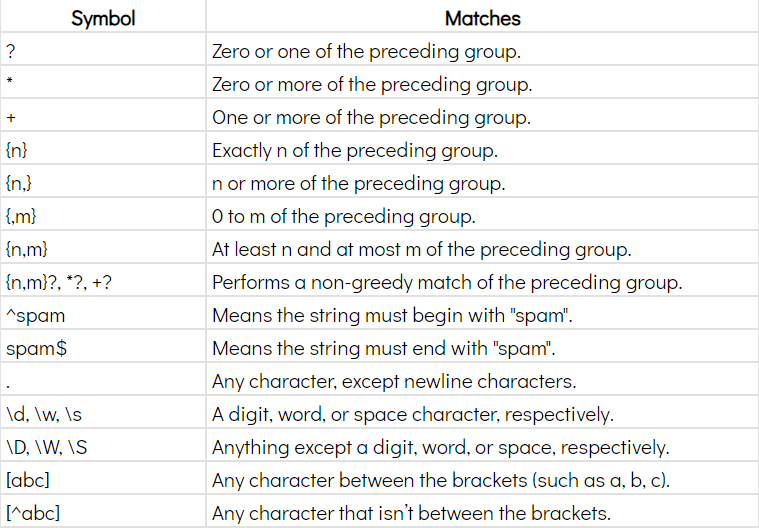
Example
phone_num_regex = re.compile(r'\d\d\d\d-\d\d\d\d\d\d')

mo = phone_num_regex.search('My number is 9834-872919.')

print(f'Phone number found: {mo.group()}')
#this will output the number in the string
Since this topic is very practical, and should be learnt through practice, you’re suggested to try examples out on your own to get the grasp of regex!
Check out - https://docs.python.org/3/howto/regex.html
Frequencies
Bag of Words(BoW)
It is nothing but a simple way to represent text data. We don’t care about the order of words not the grammar, we just care about what words appear in the sentence. It’s like putting words in a bag and then randomly counting each type of word.
Firstly, we need to create a vocabulary, that is all the unique words in our dataset. Then we count how often each word occurs in the vocabulary.
Let’s say we have sentences
S1 : I like pizza
S2 : I do not like pizza
Our vocabulary will be ["I", "like", "pizza", "do", "not"]
Now we count the number of appearances
| Word | Sentence 1 | Sentence 2 |
|---|---|---|
| I | 1 | 1 |
| Like | 1 | 1 |
| pizza | 1 | 1 |
| do | 0 | 1 |
| not | 0 | 1 |
| Total Words | 3 | 5 |
The BoW representation is :
1. Sentence 1 : [1,1,1,0,0]
2. Sentence 2 : [1,1,1,1,1]
The BoW model represents each sentence as a vector, where each dimension is a word in the vocabulary and the value in it represents the count of that word.
Term Frequency(TF)
It measures how often a specific word appears in a document, compared to the total number of words in that document. Instead of counting like in BoW, TF normalises the counts, thus for larger datasets, we can see how important a word is in context of the document. It sets the stage for more advanced models to come.
The formula for TF is
We will be using the same example like the last time.
| Word | TF of Sentence 1 | TF of Sentence 2 |
|---|---|---|
| I | 1/3 = 0.333 | 1/5 = 0.2 |
| Like | 1/3 = 0.333 | 1/5 = 0.2 |
| pizza | 1/3 = 0.333 | 1/5 = 0.2 |
| do | 0 | 1/5 = 0.2 |
| not | 0 | 1/5 = 0.2 |
| Total Words | 3 | 5 |
Inverse Document Frequency(IDF)
While TF told us about the importance of a word in a document, IDF tells us about how rare or unique a word is in the document. Using this, we can often eliminate words that carry very less context, rather than the rare words which might carry huge context. Words that appear in every document get a lower IDF (close to 0). Words that appear in fewer documents get a higher IDF.
The formula is :
We will be using the same example like the last time.
| Word | Document Frequency |
|---|---|
| I | 2 |
| like | 2 |
| pizza | 2 |
| do | 1 |
| not | 1 |
Now let’s calculate the IDFs :
| Word | Document Frequency | IDF |
|---|---|---|
| I | 2 | 0 |
| like | 2 | 0 |
| pizza | 2 | 0 |
| do | 1 | 0.693 |
| not | 1 | 0.693 |
IDF helps downweight common words (like "I") and emphasize rare words (like "do" and "not"), which are often more meaningful for distinguishing between documents.
TF-IDF
TF tells us how important a word is in a document, IDF tells us how rare that word is. Combining them gives a score that tells us how important a word is in a document, while leaving behind common words.
The formula is :